 MixMaxer
Most Shopify stores that sell to trade buyers started as retail stores, and the product pages still speak only to the retail shopper. The rental shop that wants fifty units before the season either emails, or leaves. This guide shows how one catalogue can serve both: tiered offers and packs for the everyday cart, and a request-a-quote flow for orders that need a price, a delivery date and payment terms. It uses MixMaxer for the storefront offers and SP Request a Quote with SP Hide Price & B2B Lock from Shopplaza for the trade path. The two are complementary apps, not an integration; each does its own job on the same product page.
Running example throughout: a snowboard store that sells boards, bindings and wax to riders, and to rental shops and ski schools.
The two kinds of "buy more"
A retail shopper buys one board, maybe two, and a few packs of wax. They want the discount visible before they add to cart and applied without a code: "buy 2, save 10%", "3-pack of wax for $25". The decision is made on the product page in seconds, and anything that needs a conversation loses the sale.
A trade buyer, say a rental shop ordering 50 boards of one model and 20 of another before December, wants something else: a price for that quantity, a delivery date, payment terms and an invoice. The published price is a starting point, not the answer, and the order usually mixes sizes and models. Putting 70 items through a retail cart with a percentage off does not match how the buyer works, and a 50-unit "tier" on the product page tells every retail shopper what your trade price is.
Same products, two buyers, two tools.
Where bundles stop and quotes start
A simple rule: if the price can be published, it is an offer; if it depends on who is asking, it is a quote.
| Situation | Order size | Custom price? | Payment terms? | Use |
|---|---|---|---|---|
| Shopper adds a second board | 2 to 5 units | No, the tier is public | No, pays at checkout | Volume tier |
| Shopper wants board + bindings + wax | 2 to 4 items | No, the pack price is public | No | Fixed bundle |
| Shopper picks any 3 accessories | 3 items from a collection | No | No | Mix & match |
| Rental shop orders 50 of one model | 50+ units | Yes, by quantity and relationship | Agreed in the quote conversation | Quote |
| School orders 20 boards and 20 bindings in mixed sizes | Mixed SKUs | Yes | Agreed in the quote conversation, plus a delivery date | Quote |
| Trade-only product (demo fleet, bulk wax) | Any | Yes, never shown to the public | Agreed in the quote conversation | Hidden price + quote |
Offers scale the retail cart a little, for many buyers. Quotes handle a few orders that are large or custom. Trying to do the second with the first (a 50-unit tier, a 40% wholesale code) leaks trade pricing to retail and still does not give the buyer the terms they need.
Storefront path: tiered offers in ten minutes (MixMaxer)
The retail side is three offers on the product pages, each set up in MixMaxer's offer wizard without touching theme code.
Quantity breaks on the boards. "Buy 1 at full price, 2 at 10% off each, 3 or more at 15% off each." The tier table sits on the product page, the shopper picks "Buy 2" and the cart shows the saving. Tiers can count variants together, so "2 × 156 cm + 1 × 159 cm" reaches the 3-pack price.
A fixed-price pack. "Board + bindings + a season of wax, $649" instead of $712 at list price. The pack is a real product with its own page, with size and colour chosen inside it, and per-component inventory so the pack never sells a binding you do not have.
Mix & match on the accessories collection. "Any 3 wax, tools or straps for $40." The builder lets the shopper fill the set from the collection; the cheapest items carry the discount so a shopper who adds a fourth and removes one is never charged more than the page said.
Three things matter for a store that also sells trade:
- The discount holds at checkout, in Shop Pay and at the POS counter. MixMaxer's discounts run as Shopify Functions, so the price the product page showed is the price charged, with no second discount stacking on the same item. Why product page prices and checkout prices differ explains the mechanism.
- Every offer can be A/B tested. Visitors are split 50/50 between two versions (say 10% versus 15% on the second board), each pays the variant they saw, and the winner is applied automatically. Profit per offer is read from your cost per item, so a deeper tier that sells more but earns less is visible. Volume discount tiers that make profit has the arithmetic.
- The storefront texts are editable per language, with automatic right-to-left layout for Arabic. Useful for stores that sell retail in the Gulf and trade abroad.
While the Founding 50 offer runs, the first 50 stores get MixMaxer's Pro plan at no charge until 31 January 2027, switched on automatically at install; after that it is a flat monthly price, never a share of sales.
Trade path: quotes with SP Request a Quote
This section was written with Shopplaza, the makers of the two apps.
When pricing depends on the buyer, order quantity, or negotiated terms, a fixed offer may not be enough. That's where SP Request a Quote (RFQ) comes in. The app is free to use and helps Shopify merchants manage custom quote requests and negotiations.
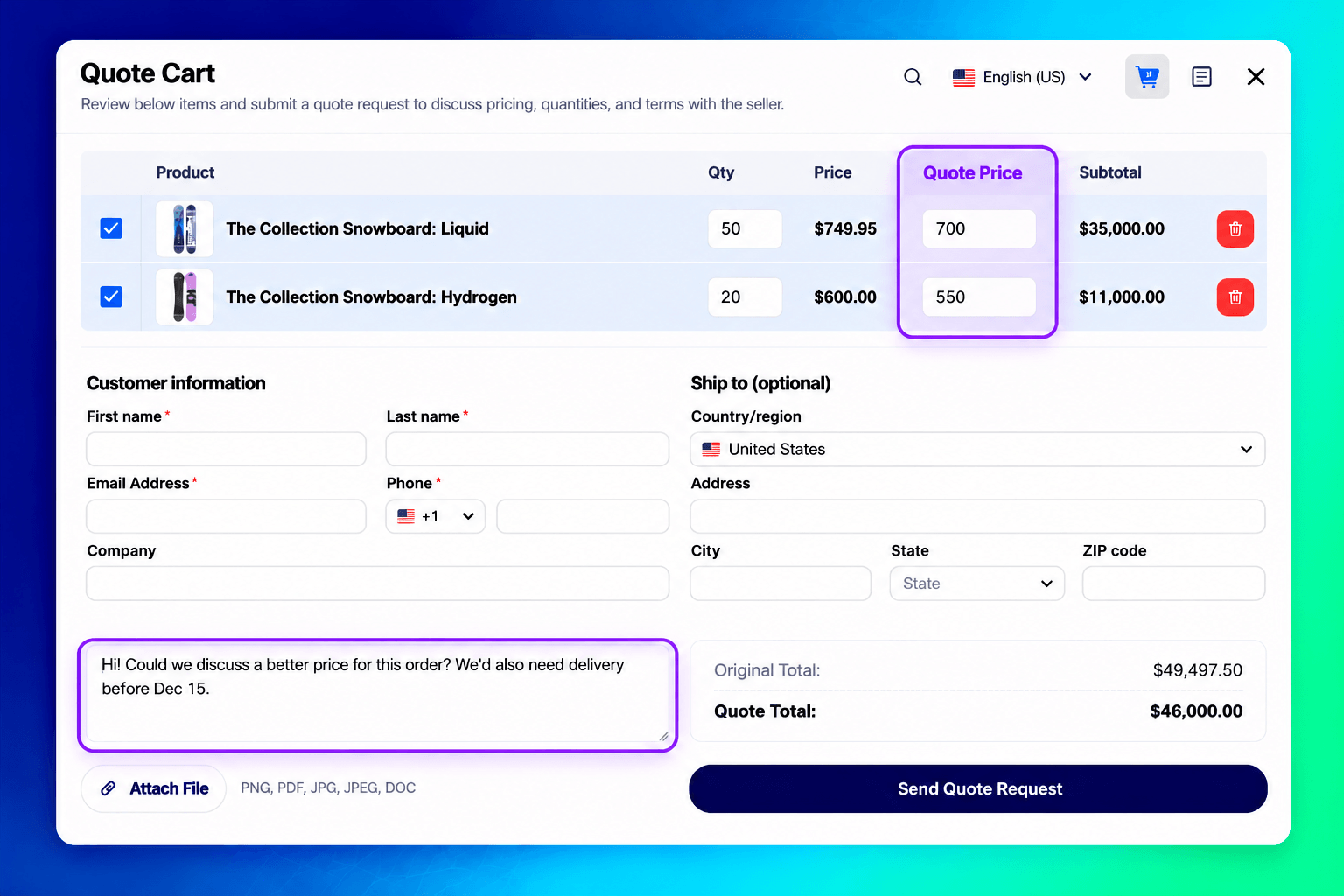
- Request a quote from the storefront. Buyers add products to a quote from the product page, collection page, cart, or a floating quote widget. They can propose their own price per item and attach files such as specifications or purchase orders.
- Set a threshold. Merchants can require a minimum total quantity or minimum quote value before a quote can be submitted, helping separate bulk inquiries from smaller purchases.
- Negotiate in one place. Merchants reply, update prices, and chat with buyers inside each quote instead of managing long email threads.
- Turn the quote into an order. When the buyer accepts, the app automatically creates a Shopify draft order and sends a checkout link. Merchants can also convert a quote manually.
!SP Request a Quote cart with two snowboards in bulk, buyer-proposed prices, contact form, and file attachment Buyers propose their own price per item, add their details, and attach files before submitting a quote request.
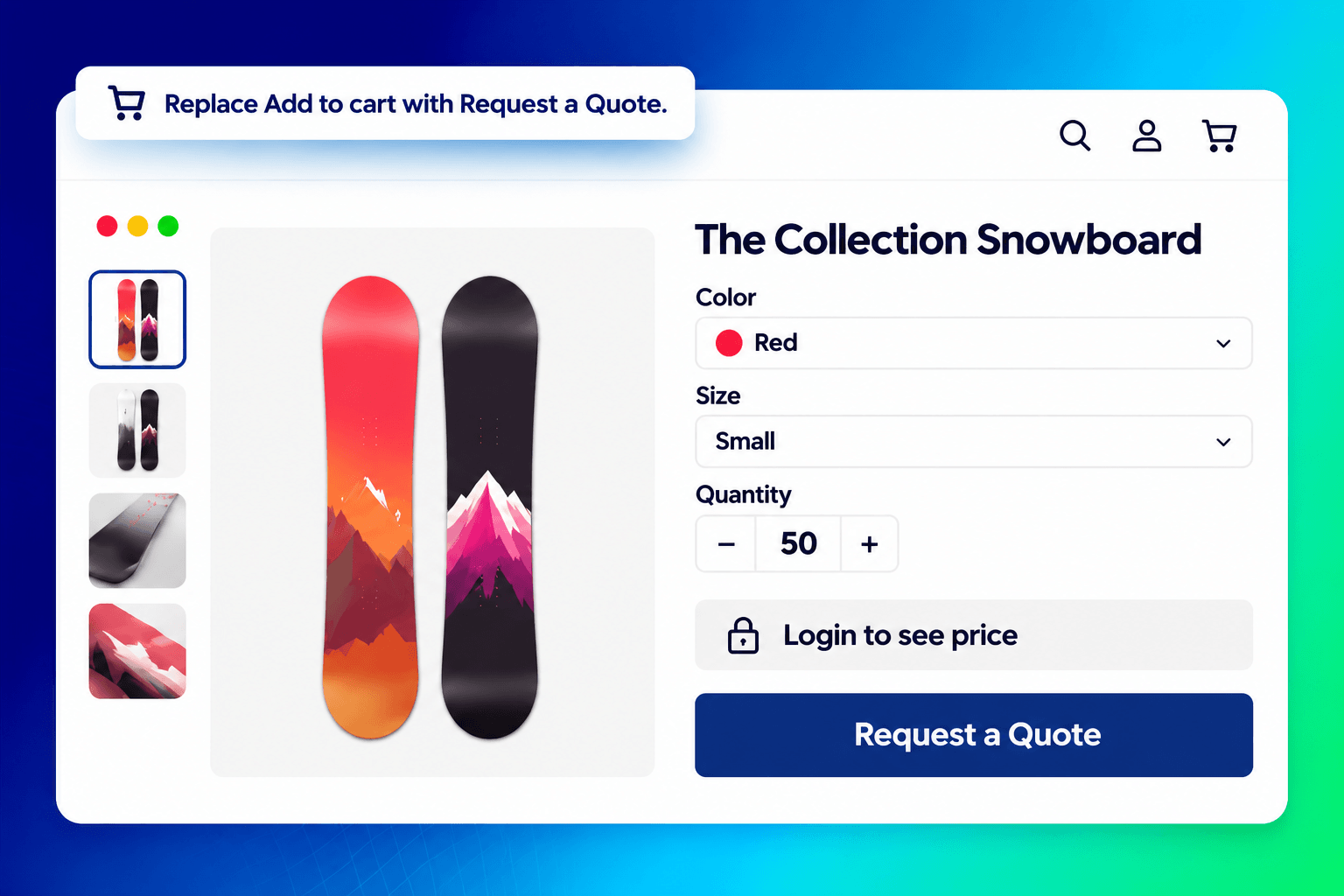
Trade-only catalogues with SP Hide Price & B2B Lock. For products that require private pricing, merchants can hide prices from guests or selected customer groups and show a "Request a Quote" button instead. Access rules can also restrict selected products, collections, or pages.
!Shopify product page with the price hidden behind "Login to see price" and a "Request a Quote" button SP Hide Price & B2B Lock hides the price for guests and shows a "Request a Quote" button instead.
In the snowboard store, the rental shop adds 50 of one model and 20 of another to the quote cart, proposes a price, and leaves a note: "Could we discuss a better price for this order? We'd also need delivery before Dec 15." The store answers inside the quote with updated pricing; once the buyer accepts, the quote becomes a draft order and the buyer gets a checkout link. Same catalogue, two paths.
Running both without confusing buyers
The two flows meet on the same product page, so a few settings keep them apart.
Cap the tier, start the quote above it. Let the volume tier run to a sensible retail quantity (3 or 5 boards) and set the quote minimum just above it. The retail tiers and quote requirements are configured separately, and a quote request can only be submitted once the minimum quantity or value is reached. The tier never becomes an accidental wholesale price.
Hide retail offers from trade accounts. With SP Hide Price & B2B Lock, a rule for customers tagged as trade can hide the price and show a "Request a Quote" button instead. In MixMaxer, target the retail offers to customers who are not tagged as trade, so a rental shop that logs in does not see "buy 2, save 10%" next to a quote button.
Keep the offer copy honest. Call the tiers what they are: retail pricing. A line such as "Ordering 10 or more? Request a trade quote" under the tier table sends the right buyer to the right path without hiding anything.
Black Friday. Retail offers scale up in November: deeper tiers on the hero boards, a gift above a cart value, a Cyber Monday box. Trade quotes stay off the sale, because the trade price was never the retail price minus a percentage. Black Friday bundle strategy for Shopify covers the retail side.
Setup checklist
- Install MixMaxer and SP Request a Quote (and SP Hide Price & B2B Lock if some products are trade-only).
- Build the retail offers: one quantity break on the hero products, one pack, one mix & match set. Fill in cost per item first so profit per offer is readable.
- Set the tier cap (for example, up to 5 units) and the quote threshold (from 6 units or from a quote value).
- Tag trade customers and hide retail offers from that tag; hide prices on trade-only products.
- Add one line under the tier table pointing trade buyers to the quote button.
- Test as a guest (tier, pack, checkout price), then as a tagged trade customer (quote button, hidden price, the quote email, draft order and checkout link).
FAQ
Do MixMaxer discounts stack with a negotiated quote?
They're designed for different orders: an accepted quote can be converted into a Shopify draft order with negotiated prices, while MixMaxer's offers are intended for the retail cart. Test a quote end to end to confirm that no automatic discount applies on top in your store.
Does the quote app see bundle prices?
No, and it does not need to. The buyer proposes a price per item in the quote; the retail tier is for the cart. There is no integration between the two apps; they work side by side on the same product page.
Do the retail offers work at the POS counter?
Yes. MixMaxer's volume tiers, packs, gifts and mix & match discounts are Shopify Functions, so they apply in Shopify POS and in Shop Pay as well as the online checkout.
Can I run the storefront in Arabic?
MixMaxer's storefront texts are editable per language and the layout turns right-to-left automatically for Arabic, Hebrew and Persian. For the quote apps, check Shopplaza's listings for the languages they support.
Where do I get help?
MixMaxer's help centre is at mixmaxer.com/help with chat and email support on every plan. For SP Request a Quote and SP Hide Price & B2B Lock, support is on their App Store listings linked above.